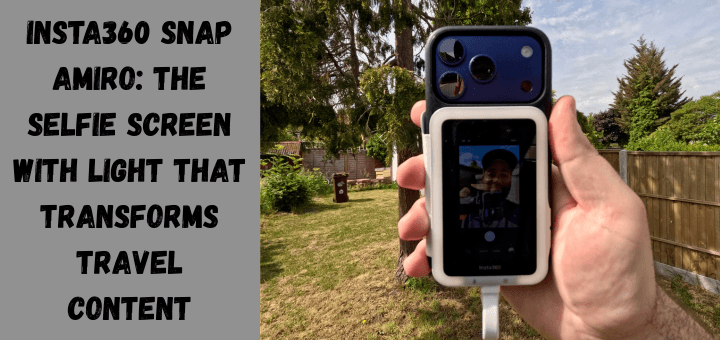
The Insta360 Snap Amiro Selfie Screen is one of those rare travel accessories that immediately solves a problem many creators have simply learned to live with.
When you are filming yourself on the road, especially as a solo traveller, you often rely on the front-facing camera to check your framing.
The trouble is that the front camera on most phones, including the iPhone 17 Pro, is noticeably weaker than the rear camera.
You lose sharpness, detail and dynamic range, and the difference becomes even more obvious in low light.
The Insta360 Snap Amiro changes that dynamic completely by giving you a magnetic preview screen that lets you finally use the phone’s best camera without guessing where you are in the frame.
It feels like unlocking a feature your phone should have had all along, and it instantly elevates the quality of your travel footage.
The Built-In Light That Makes a Bigger Difference Than Expected

One of the most impressive aspects of the Snap Amiro is the integrated light. At first glance, it seems like a small addition, but in practice, it becomes one of the most valuable features.
Travel often means filming in unpredictable lighting conditions, from dimly lit restaurants to night markets to early morning streets.
The built-in light brightens your face just enough to help the camera lock onto you, and it works beautifully with the iPhone’s night mode.
The result is footage that looks cleaner, sharper and far more professional. Before using the Snap Amiro, I often defaulted to the front camera whenever lighting was less than ideal.
Now I can confidently use the rear camera in almost any situation and still get a well-lit, flattering shot. It is a simple improvement that has a huge impact on the final look of your content.
You can purchase two versions of the Snap: one with the light feature and one without. The price difference is roughly around £10 between the two versions, and I would highly recommend the light version for the extra cash. Well worth the upgrade.
The Upgrade From 18MP to 48MP That You Can Actually See

The difference between the front and rear cameras on the iPhone 17 Pro is not subtle. The front camera captures 18 megapixels, while the rear camera shoots a full 48 megapixels in cinematic mode. That is a massive jump in detail, and when you are creating travel content, every bit of clarity counts.
Landscapes look richer, skin tones look more natural, and the overall image feels more cinematic.
The Snap Amiro finally makes it practical to use the rear camera for selfies, vlogs, and walk-and-talk clips (Which I do a lot of as a solo traveller).
It is the kind of upgrade you notice immediately when you compare footage side by side.
For creators who care about quality, this alone makes the device worth considering.
If you want to explore the differences further, you can dive into the rear camera’s advantages or look at the cinematic mode’s benefits.

The above picture was taken using the iPhone 17 Pro 18 Megapixel front-facing camera.

The above picture was taken with the Insta360 Snap, enabling full use of the iPhone 17 Pro’s 48-megapixel sensor.
Simple Setup That Fits Effortlessly Into a Travel Workflow

One of the things I appreciate most about the Snap Amiro is how easy it is to use.
There is no app to install, no pairing process and no battery to charge.
You simply attach it to the MagSafe mount on the back of your phone, plug the USB-C cable into your device and the screen powers on instantly.
When you are travelling, simplicity matters.
You do not want to spend time fiddling with settings or troubleshooting connections.
The Snap Amiro feels like a tool designed for people who are constantly on the move and need gear that works immediately.
One thing you will need to set up on your iPhone 17 Pro if you wish to use the Snap’s touchscreen feature is to go to Settings > Accessibility and make sure Zoom is turned on. Tap on the screen with three fingers to zoom out. And you’re all set up and ready to rock and roll. Nothing else to do, and you will be able to use the touch screen features of the snap.
MagSafe Mounting That Feels Secure and Travel Ready

I use an OtterBox MagSafe case on my iPhone 17 Pro, and the Snap Amiro attaches securely with no wobble or shifting. I like that I don’t have to remove my case to use the Snap MagSafe attachment feature, making bg everything go smoothly.
It feels solid even when walking and filming simultaneously. If your phone or case does not support MagSafe, Insta360 includes a magnetic ring sticker in the box so you can still use the device.
Even the cable and protective case are magnetised, which keeps everything neatly organised in your gear bag. These small touches make a big difference when you are packing light and want your gear to stay tidy.
The Magnetic Cover That Helps and Occasionally Gets in the Way

The Insta360 Snap Amiro includes a magnetic cover that protects the screen when travelling. It also folds over the front of your phone, acting as a guard to prevent accidental taps on your main screen while filming.
This is genuinely useful, especially when you are shooting on the go.
However, the cover is fixed in place and cannot be removed. While it does its job well, there are moments when I wish it could slide off or detach entirely.
When the device is mounted on a tripod, the cover can flap around slightly, which is not ideal. It is not a major issue, but it is something to keep in mind if you frequently film static shots.
The USB-C Limitation That Matters Depending on Your Setup

Because the Snap Amiro uses your phone’s USB-C port for power, you cannot plug in a USB-C wireless microphone at the same time.
For creators who rely on a direct plug-in mic, this can be a limitation.
However, there are also clear advantages to the USB-C design. The device never needs charging, which is a huge relief when you already travel with multiple gadgets that require constant power management.
The direct connection also eliminates lag, making the preview screen responsive and reliable.
Competing devices that use Bluetooth often suffer from noticeable delay, which can be frustrating when you are trying to frame a shot accurately.
If you use a wireless mic with its own transmitter, you will not have any issues.
Real World Use While Travelling

After using the Insta360 Snap Amiro on the road, the biggest improvement I noticed was the overall quality of my selfie footage.
The jump from the front camera to the rear camera is dramatic, and the built-in light makes every shot look more polished.
The device is compact enough to slip into any travel bag, and the plug-and-play design speeds up my filming process.
I no longer waste time guessing my framing or reshooting clips because I drifted out of the shot.
Everything feels faster, smoother and more reliable.
It is the kind of accessory that quietly improves your workflow without demanding attention.
Final Thoughts on the Insta360 Snap Amiro

The Insta360 Snap Amiro Selfie Screen With Light is a clever, travel-friendly tool that genuinely enhances mobile content creation.
It solves a real problem by letting you use your phone’s best camera while still seeing yourself, and it does so with a simple, reliable design.
The fixed cover and USB-C limitation are worth noting, but the benefits far outweigh the drawbacks.
If you want to improve your travel selfies, vlogs, and on-the-go footage without adding bulk to your kit, the Snap Amiro is a smart addition to your setup at an affordable price, especially when combined with the lighting feature edition.